
23 September 2026
Elias Blanckaert, Iris Jennes & Wendy Van den Broeck
Extended Reality (XR) is increasingly used for professional collaboration, training, healthcare and cultural heritage. Advances such as haptic feedback, intelligent virtual humans and holoportation are making these experiences more interactive and realistic. However, more advanced technology does not automatically make XR easier to use. Depending on the application, users may need to navigate a three-dimensional environment, manipulate objects, use unfamiliar controls and interpret system feedback. Because interaction patterns differ between applications, even experienced XR users may need to learn both what to do and how a new system works.
This policy brief provides XR researchers, developers and organisations with five requirements for designing accessible and user-friendly first-time XR experiences. Here, accessibility means reducing the barriers users encounter when using a particular XR application for the first time. The requirements are based on findings from the PRESENCE project where users conducted very different tasks across four immersive XR contexts (see Image 1). In professional collaboration, users collaboratively explored and adapted a virtual chair. In manufacturing training, they operated a virtual press machine. In healthcare, they played an interactive game in which they caught musical notes while being guided through a virtual environment, while in cultural heritage they progressed through tasks within a historical escape narrative.
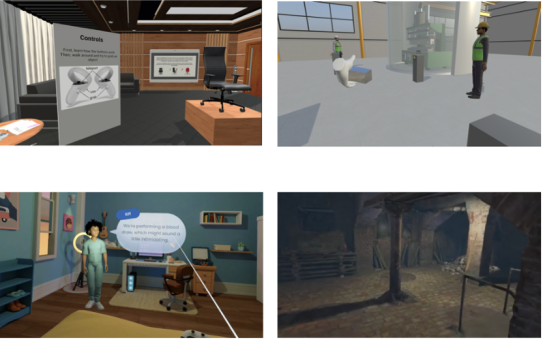
Image 1: The four XR use cases examined in the study: professional collaboration (top left), manufacturing training (top right), healthcare (bottom left), and cultural heritage (bottom right).
Highlights
| We examined first-time interaction with immersive XR across four different contexts. Through co-creation workshops and semi-structured interviews with 48 users, we compared experiences in professional collaboration, manufacturing training, healthcare and cultural heritage to identify recurring challenges and needs. |
| Previous XR experience does not mean users automatically know how to use a new XR application. XR applications can differ in their purpose, tasks and interaction patterns, meaning that even experienced users may need to learn what to do and how to interact. |
| Five recurring requirements can support more accessible first-time XR interaction. Across the four contexts, we identified continuous guidance, low-friction interaction, predictable system behaviour, contextual alignment, and transparency with user control. These five requirements are summarised in Image 2 and discussed in the following sections. |
| The five requirements are translated into practical questions for XR development and implementation. These guiding questions can help anyone involved in the development and implementation of XR experiences to design an accessible XR experience |
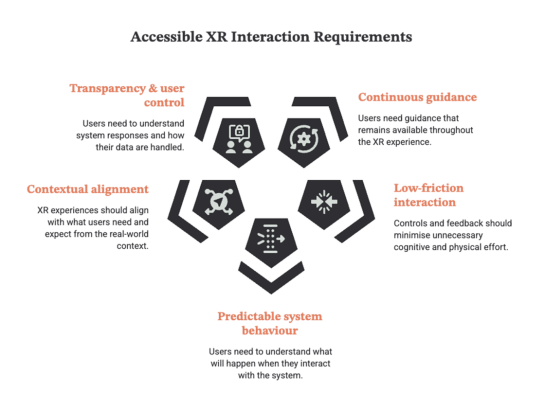
Image 2: Five requirements for accessible first-time XR interaction.
1 Five requirements
1. Continuous Guidance
XR applications often introduce users to controls and tasks before the experience begins. Our findings show that providing instructions only at the start is often not enough. Across the use cases, users could sometimes operate the system while remaining uncertain about what they were expected to do. This was particularly visible in task-oriented environments. During manufacturing training, for example, one participant wondered:
“Is there some task I have to complete, or shall I play with it?”
The problem was not necessarily an inability to interact. The user could interact, but the structure and purpose of the interaction were unclear. Similar needs emerged in healthcare, where participants emphasised the importance of step-by step guidance, and in professional collaboration, where prior instructions helped users understand the goal of the experience. Users may also forget instructions or become uncertain after entering the environment. Guidance should therefore remain available when they need it. This can include contextual prompts, visual cues, clear task progression or help that can be accessed without leaving the experience. Immersive XR should therefore provide continuous, accessible and retrievable guidance that helps users understand the purpose of the experience and what is expected of them throughout it. For XR developers, the lesson is straightforward: making guidance available when and where users need it, rather than relying only on instructions provided at the start.
2. Low-Friction Interaction
Immersive systems can ask a lot from users at once. They may need to remember controls, coordinate movements, navigate a virtual space and interpret feedback while simultaneously completing the actual task. Across the PRESENCE use cases, seemingly small interaction problems could therefore become significant barriers. Participants sometimes struggled with controller input because they could no longer see the physical controller while wearing a headset. Navigation through teleportation could be difficult to control accurately. Difficulties also occurred with newer interaction technologies when the relationship between physical movement and the resulting virtual action was unclear. Such problems shift attention. Instead of thinking about the training, collaboration or experience itself, users start thinking about the interface: Which button do I need? Why did I move there? Why did the object not respond?
The aim should not necessarily be to make every XR activity simple. A manufacturing procedure or healthcare application may be inherently complex. What should be avoided is unnecessary complexity created by the interaction itself. Controls should be understandable, actions should produce clear feedback and interaction should require as little unnecessary cognitive and physical effort as possible.
3. Predictable System Behaviour
Users also need to understand what they can expect from an immersive environment. In XR, virtual objects and spaces can create expectations about how they should behave. For example, when users pick up and release a virtual object, they may expect it to fall to the ground, as a physical object would. If it does not, or if similar objects behave differently, users may become uncertain about the rules of the environment. Similarly, navigation should take users where they expect to go, while haptic feedback should correspond to what users see and do. Our findings show that users quickly notice when these expectations are not met. In professional collaboration, inconsistent object behaviour made the virtual environment more difficult to understand. In manufacturing training, abrupt navigation and unexpected haptic feedback similarly conflicted with users’ expectations. Instead of concentrating on the task, users had to interpret why the system behaved as it did. Predictable behaviour therefore contributes to trust. When actions repeatedly produce understandable outcomes, users can develop reliable expectations about how an environment works. This becomes particularly important as XR technology becomes more sophisticated. Realistic graphics, haptic feedback or embodied interaction can increase expectations of realism. If the system then responds inconsistently, greater technological realism may make these inconsistencies more noticeable.
For XR-development, consistency can therefore be more valuable than technological novelty.
4. Contextual Alignment
XR experiences should align with what users need and expect from the real-world context in which they are used. What this means can differ between applications. In healthcare, participants emphasised the importance of maintaining a connection to the physical care environment. Being fully immersed in a virtual environment could reduce their awareness of what was happening around them, while participants still wanted to understand and retain some control over the real-world situation. In cultural heritage, contextual alignment meant something different. Participants questioned the value of an immersive representation when its relationship with historical reality was unclear. Here, the concern was not the level of immersion itself, but whether the experience felt credible and meaningfully connected to the historical context. The same principle applies elsewhere. Manufacturing training should reflect the procedures and expectations relevant to the actual task. Professional collaboration should facilitate communication and cooperation rather than simply create an impressive virtual environment. The question should therefore not simply be “How can we insert XR in this experience?” but “What kind of XR supports what users need to do?”
These examples show that how an XR experience is designed should depend on the needs, expectations and real-world context of its users. Technological sophistication should not become a goal in itself. Realism, interaction and sensory stimulation should be selected because they support the intended context.
5. Transparency And User Control
Finally, users need to understand what the XR-system is doing. This goes beyond knowing which button to press. Users also need feedback about how the system interprets their actions. Did the application recognise a gesture? Was an action completed correctly? Why did a virtual element respond in a particular way?
The need for transparency took different forms across the use cases. In manufacturing training, users needed clear feedback to understand whether their actions were recognised and performed correctly. In healthcare, questions emerged about privacy and how personal data were being handled. Transparency therefore operates at two interconnected levels. At the interaction level, users need sufficient feedback to understand how the system responds to them. At the data level, users need to understand what relevant information is collected from them and how it is used. This becomes increasingly important as XR-systems incorporate cameras, body tracking, haptic equipment and intelligent virtual humans. Such technologies can create richer interactions while making the underlying system more difficult for users to understand. Transparency should therefore not be treated only as information in a privacy notice. It should be reflected in the interaction itself. Users should understand what the system is doing and retain meaningful control over their experience.
2. From Findings To A Practical Design Toolkit
2.1. Five Guiding Questions
Taken together, the five requirements provide a practical way of thinking about first-time XR interaction. They do not prescribe how every immersive application should look or function. Rather they provide a framework for considering accessibility and usability of immersive applications. To translate these findings into practice, each requirement can be reformulated as a guiding question for developers and organisations. Table 1 brings these five questions together as a practical tool for use throughout design and evaluation.
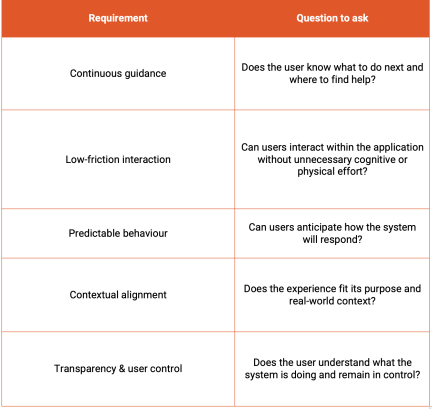
Table 1: Five guiding questions for accessible XR development
2.2. Recommendations For XR-Development
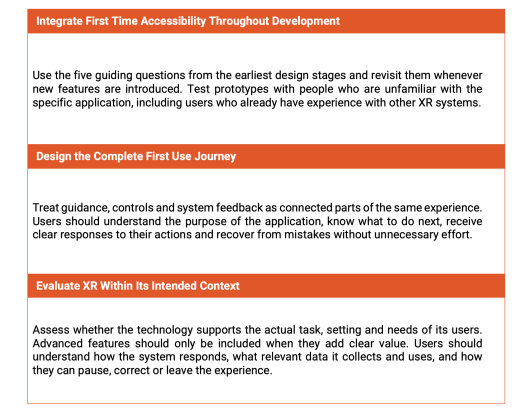
The following recommendations show how developers and organisations can apply the five requirements throughout the design, implementation and evaluation of immersive XR applications.
These findings should not be interpreted as a universal checklist for all forms of XR accessibility. The research focused primarily on relatively short first-time interactions with immersive, headset-based applications and early-stage prototypes. Further research with more diverse users and mature XR-systems can examine how these requirements develop over longer periods of use. Nevertheless, the recurrence of these requirements across professional collaboration, manufacturing training, healthcare and cultural heritage shows why first-time interaction deserves attention from the beginning of XR-development. As XR becomes more sophisticated, ensuring that people can understand and use it should remain a fundamental measure of progress.
3. About The Research
This policy brief presents findings from research conducted within PRESENCE, a Horizon Europe Innovation Project co-financed by the European Commission under Grant Agreement ID 101135025, developing technologies for hyper-realistic XR-based interaction between humans and between humans and machines. The study examined first-time interaction with immersive XR applications across professional collaboration, manufacturing training, healthcare and cultural heritage. User experiences were explored through co-creation workshops and semi-structured interviews and compared across contexts to identify recurring design requirements. The research identified five requirements for accessible first-time interaction: continuous guidance, low-friction interaction, predictable system behaviour, contextual alignment, and transparency with user control.
This policy brief is based on: Blanckaert, E., Jennes, I., & Van den Broeck, W. (forthcoming). Making Immersive XR Accessible: Cross-Use-Case Design Requirements for Initial Interaction. Proceedings of the ACM IMX Workshops (ISIM ’26)

DOWNLOAD THE POLICY BRIEF
Authors
Elias Blanckaert
Elias Blanckaert is a researcher at imec-SMIT, Vrije Universiteit Brussel (VUB). Since 2022, he has worked as a user researcher, focusing on innovation in the media landscape and the use of new technologies. His research expertise includes living lab and co-creation methodologies, as well as immersive technologies and XR experiences.
Contact details:
Email: Elias.Blanckaert@vub.be
Affiliation: imec-SMIT, Vrije Universiteit Brussel (VUB)
Address: Pleinlaan 9, 1050 Brussels, Belgium
Iris Jennes
Iris Jennes is a researcher and PhD candidate at imec-SMIT, Vrije Universiteit Brussel (VUB). Her research focuses on media innovation, including immersive and personalised media experiences. As a user researcher, she works with qualitative research methods, co-creation, living lab methodologies and human-centred design. Her PhD research examines innovation in television advertising in Flanders and the ways in which television audiences are defined and measured.
Contact details:
Email: Iris.Jennes@vub.be
Affiliation: imec-SMIT, Vrije Universiteit Brussel (VUB)
Address: Pleinlaan 9, 1050 Brussels, Belgium
Prof. Dr. Wendy Van den Broeck
Prof. Dr. Wendy Van den Broeck is Associate Professor in Communication Sciences at Vrije Universiteit Brussel (VUB) and Unit Lead of the Media, Marketing and User Experience (MUX) unit. Her research expertise includes innovative and participatory research methods, living lab research, user research, new media, personalised and immersive media, and digital skills and practices. She is involved in several Horizon Europe projects in the field of personalised and immersive media and supervises PhD research in communication sciences.
Contact details:
Email: Wendy.Van.den.Broeck@vub.be
Affiliation: imec-SMIT, Vrije Universiteit Brussel (VUB)
Address: Pleinlaan 9, 1050 Brussels, Belgium
Media, Marketing & User Experience (MUX) Unit – Unit Lead: Prof. Dr. Wendy Van den Broeck


